
Client Management
Every client. All the important details. One organized record.
Keep client information, contact details, tax engagements, and related activity together.
Tax practice management software for tax preparers
Managing a tax office shouldn't mean chasing missing W-2s, searching through emails, or constantly asking your team for updates.
IMARA TAX brings client intake, document requests, return progress, appointments, follow-ups and payments into one organized workspace.
Spend less time managing the chaos around tax preparation—and more time serving your clients.
Already using tax preparation software? Keep it. IMARA TAX helps you manage the work surrounding the return.

Sound familiar?
Your team knows how to prepare tax returns. But during filing season, the biggest frustrations often come from everything happening around the return.

A client sends three documents. Two are still missing. Your team spends valuable time figuring out what's outstanding.
Clients forget to complete intake, answer questions, or send requested information. Someone has to keep reminding them.
A client calls asking about their return. Your staff has to check with the preparer before answering.
Emails, documents, appointments, notes, and client conversations live in different places.
A return is waiting for a missing document, a review, or a signature—but the delay isn't always visible.
As the owner, everyone turns to you for updates, decisions, and follow-ups.
More administrative work. More interruptions. Less time for your clients.
It doesn't have to work that way.
Meet IMARA TAX
IMARA TAX helps you organize the operational side of your tax practice, so you can see where every client stands and what needs attention.
Instead of searching through emails, folders, and spreadsheets, your team works from one shared system.
Know what's happening. See what's missing. Keep work moving.
See IMARA TAX in Action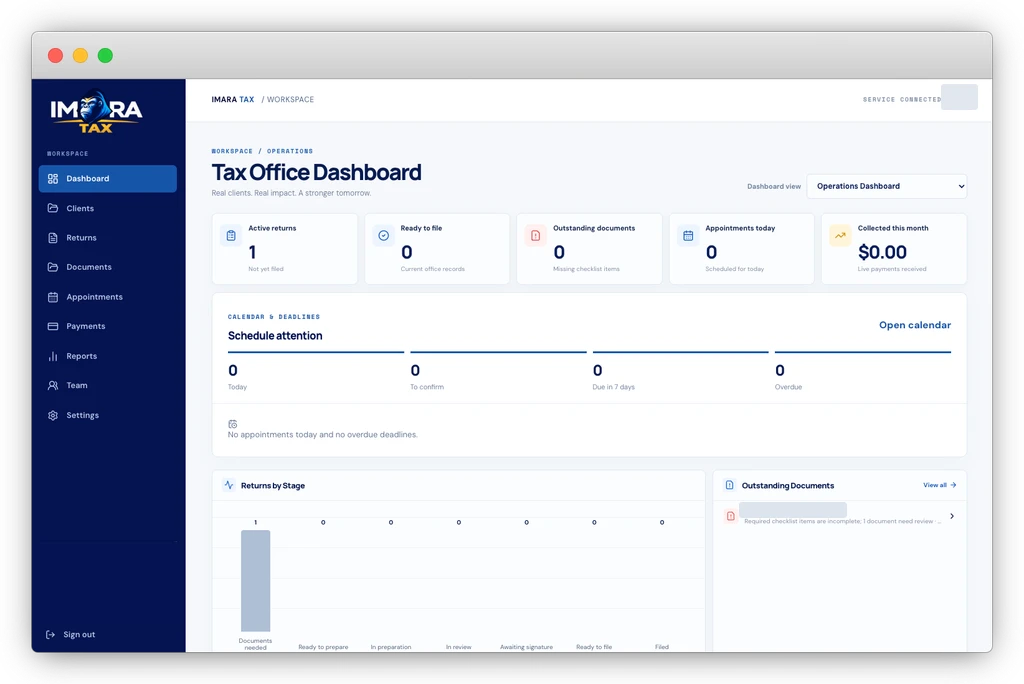
Built for the way tax offices work
Keep client information, contact details, tax engagements, and related activity together.
Clients can complete intake online, and your office can see which information still needs attention.
Request documents, organize client uploads, and identify outstanding items without searching through email threads.
Follow tax engagements through their office workflow and identify the next action needed to move the work forward.
Track appointments, follow-up needs, and commitments that require attention.
Give your office a more organized way to communicate with clients about outstanding requests.
Make assignments, outstanding responsibilities, and handoffs more visible to the office.
Keep payment requests and recorded payment activity connected to client records. Online payments require your office to set up a payment provider.
From client intake to completion
Create or invite clients, collect their information, and organize their tax engagements.
Request documents, receive uploads, and see which items are still outstanding.
Track preparation, review, signatures and other configured office workflow stages.
See outstanding actions, responsibilities, communications and payment status in context.
One office. One organized workflow. Fewer things falling through the cracks.
Watch the Product WalkthroughA recorded walkthrough is in production. Until it is ready, this takes you to the real screens and a live demo.

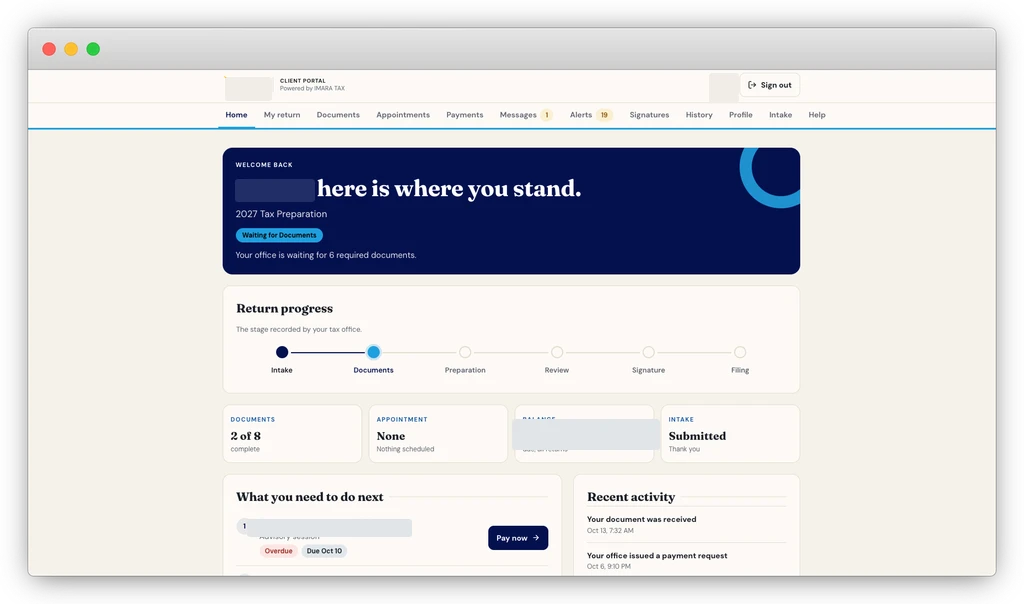
A better experience for your clients
Your clients want a simple, professional way to work with your office. Give them a dedicated online portal where they can complete the steps your firm makes available.
Steps depend on what your office enables. Online payment requires your office to connect a payment provider.
Less back-and-forth for your team. A clearer experience for your clients.
Explore the Client PortalBuilt to complement your tax software
Your tax preparation software handles tax calculations and return preparation. But running a tax office involves much more: client information, document requests, communication, deadlines, staff responsibilities, and outstanding work. That's where IMARA TAX comes in.
A category comparison, not an integration claim. IMARA TAX works alongside your current software. It does not connect to it automatically.
Your tax software prepares the return. IMARA TAX runs the tax office.
IMARA TAX helps you manage the people, processes and progress surrounding the tax return.
See How It Fits Your Practice (opens the scheduling page in a new tab)
Designed for tax professionals

Stay organized with client information, document requests, appointments, and outstanding work.

Help staff understand client progress, missing information, and the next required action.

Improve visibility into responsibilities, handoffs, and operational bottlenecks.
See IMARA TAX in action
See how a tax office can collect client information, request outstanding documents, track a return, and identify the next action—all within IMARA TAX.
In a live demo we walk through the real product with sample data. No client records needed.
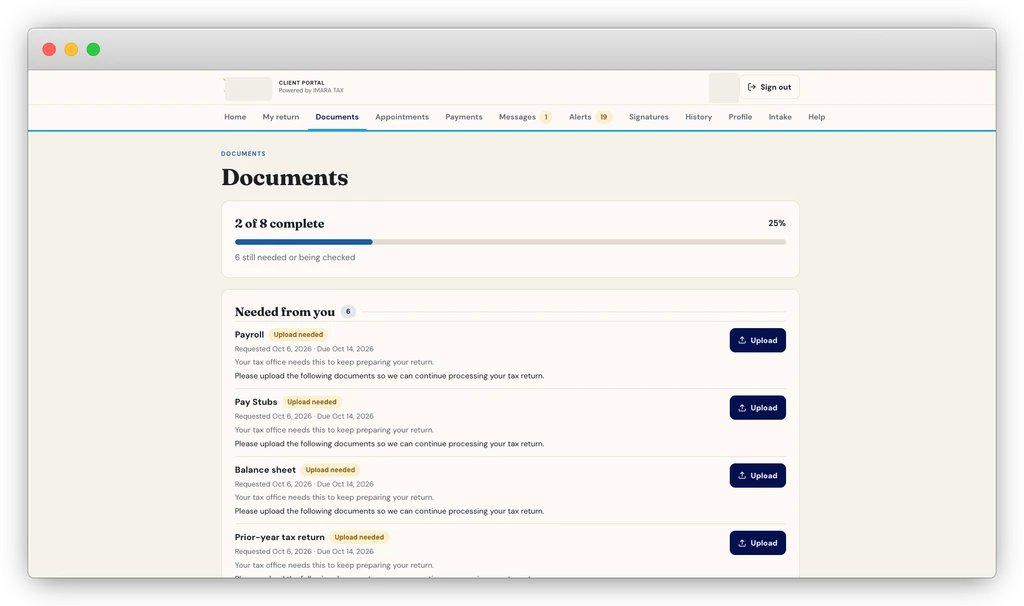
Authorized staff use the office workspace. Clients sign in to a separate portal for their own information and requests.
These are selected views of the actual IMARA TAX application, with identifying details obscured. No fictional dashboards.
Explore the office and client workflows in a live demonstration and ask about the needs of your practice.
Pricing
A solo preparer and a multi-preparer office have different needs. Book a short demo to discuss your client volume, your team, and pricing for your practice.
Prefer to explore first? Create an Office
Frequently asked questions
Still unsure whether IMARA TAX fits your office? Ask us directly in a 15-minute call.
Ask in a Demo (opens the scheduling page in a new tab)No. IMARA TAX manages the operational side of a tax practice, including intake, document collection, workflow, communication and other office activities. You continue using your preferred professional tax preparation software to calculate and prepare returns.
Yes. IMARA TAX is designed to help solo preparers organize their client information and daily work, while also supporting offices with multiple staff members.
Yes. The Client Portal supports uploading documents requested by the tax office.
Yes. IMARA TAX provides engagement and workflow tracking so authorized team members can see return progress and outstanding actions.
IMARA TAX helps offices track outstanding intake information and document requests requiring follow-up.
No. IMARA TAX is designed to complement your existing tax preparation workflow, not replace the software you use to prepare returns.
You can schedule a demonstration to see how the platform supports common tax-office workflows.
Yes. IMARA TAX supports office operations involving multiple authorized team members and assigned responsibilities.
Get ready for the 2027 filing season
Give your team a clearer way to manage tax-office operations with IMARA TAX.
Get every return off to the right start.